 Mueen Studio
A+ Content is the section of an Amazon product page below the bullet points, where brand owners can replace a plain text description with images, comparison charts and branded layouts. Amazon first called it Enhanced Brand Content (EBC) and later renamed it A+ Content; they’re the same feature. This guide covers how to plan, design and publish A+ that does its job: answering the buyer’s last questions before they add to cart.
Who can use A+ Content?
A+ Content is available to brand owners enrolled in Amazon Brand Registry, and to some vendors. You create it in the A+ Content Manager in Seller Central, attach it to one or more ASINs, and submit it for review. It goes live once Amazon approves it.
Basic A+, Premium A+ and Brand Story
- Basic A+ combines modules from a standard library: image headers, image-and-text blocks, four-image grids, comparison charts and more.
- Premium A+ adds larger, full-width images and interactive formats such as image carousels, hotspots and Q&A blocks. Amazon sets its own eligibility rules for Premium; check what your account shows in the A+ Content Manager.
- Brand Story is a separate, swipeable carousel about the brand that appears on every product it’s attached to. It’s ideal for cross-selling your other products.
Step 1: plan the story before you design
Good A+ isn’t decoration. Each module should answer one question a buyer has after reading your title, images and bullets. Before opening any design tool, list those questions. Your reviews, competitors’ one-star reviews and your customer service inbox are the best sources.
A structure that works for most products:
- Hero header: the product in use with one clear promise.
- Key benefits: three or four benefits, each with an image that proves it.
- How it works or how to use it: steps, especially for anything with assembly, dosage or setup.
- Details that remove doubt: materials, sizes, what’s in the box, care instructions.
- Comparison chart: your variants or your range side by side, so the buyer picks the right one instead of leaving.
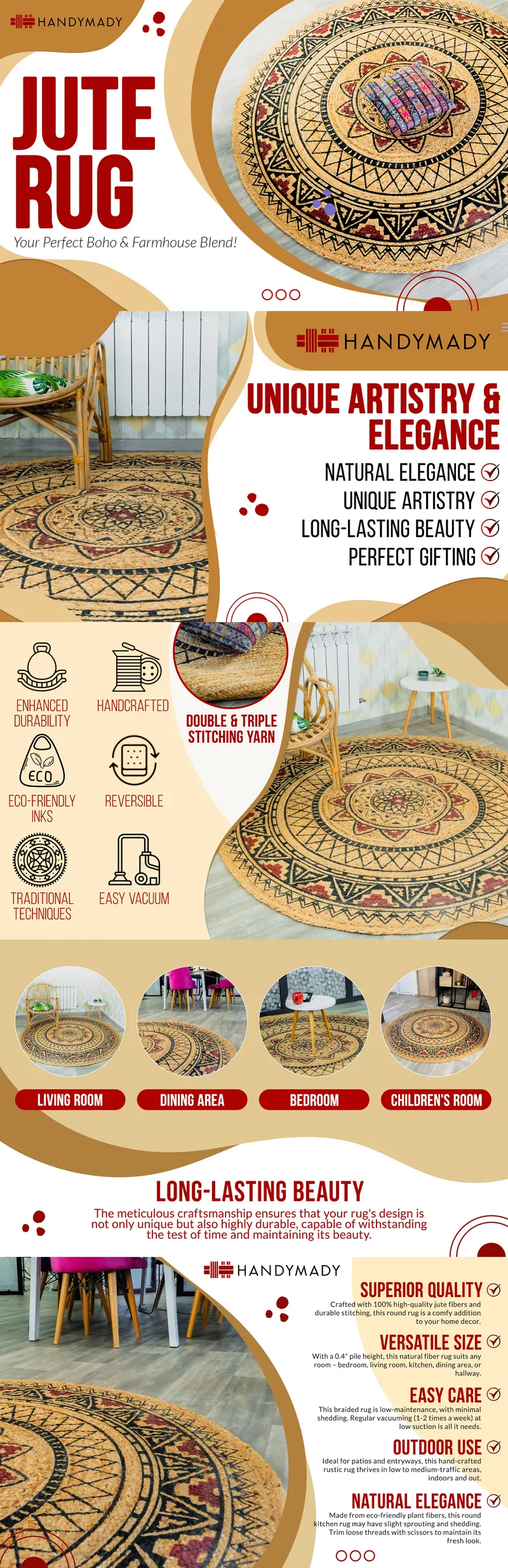
On the Mueen Studio home page you can see the range in practice: a jute rug with seven modules, baby ear muffs with five, a paw cleaner with six. The count follows the questions, not a template.
Step 2: design for a phone first
Most Amazon shoppers browse on mobile, where A+ modules shrink to the width of the screen. Small text baked into images becomes unreadable.
- Keep text in images large and short: a headline and a few words, not a paragraph.
- Put longer explanations in the module’s text fields rather than in the image.
- Use high contrast and one focal point per image.
- Preview every module on mobile in the A+ Content Manager before you submit.
Step 3: build images to the module sizes
Each module has its own image dimensions, and the builder crops anything that doesn’t match. Common sizes include:
| Module | Image size (px) |
|---|---|
| Standard image header with text | 970 × 600 |
| Standard image with text overlay | 970 × 300 |
| Standard four images and text | 220 × 220 each |
| Standard company logo | 600 × 180 |
| Premium full image | 1464 × 600 |
Amazon updates its module library from time to time, so confirm the size shown in the module builder before exporting. Fill in each image’s keyword (alt text) field with a plain description of what the image shows.
Step 4: make it match your packaging
The strongest A+ looks like the box the buyer will receive. Use the same colours, typefaces, icons and photography style as your packaging, and show the pack itself in a module. It builds trust, and the buyer recognises the product when it arrives.
This is why I design A+ from the same artwork as the packaging. A pack built as a system already contains the parts A+ needs. In the Timeless Radiance case study, the collagen carton carries benefit claims, five ingredient infographics and two study summaries, the same building blocks a set of A+ modules uses. That client’s next request was Amazon pages for their other products.
Step 5: avoid what gets A+ rejected
Amazon reviews every submission against its A+ guidelines. The most common reasons for rejection:
- Pricing, discounts or promotional language such as “sale” or “free shipping”.
- Time-sensitive claims such as “new for this season” or “limited time”.
- Claims like “best-selling” or “#1”, and guarantees or warranty promises.
- Customer reviews, quotes or star ratings.
- Contact details, website links or references to other sales channels.
- References to competitors or their products.
- Low-resolution, stretched or watermarked images, and text that is hard to read.
Check the current guidelines in Seller Central before submitting; a rejection usually names the module and the reason, so fixes are quick.
Want it done for you? See examples and what’s included on the Amazon A+ Content design page. Basic A+ Content (EBC) with 7 modules is $400, and Premium A+ Content with a continuous-flow design is $450.
Step 6: measure and refresh
Once A+ is live, watch conversion rate and returns for the ASIN in your Business Reports. If Amazon offers A/B testing for your account through Manage Your Experiments, test one change at a time, such as a different hero image or a comparison chart. Refresh A+ when you launch new variants, change packaging or see the same question come up in reviews.